Context
Drupal's full text with summary is no longer the default field for body content.
It is still available, but is it the right solution?
I am using some standard headers in the content, which are appearing in listings:
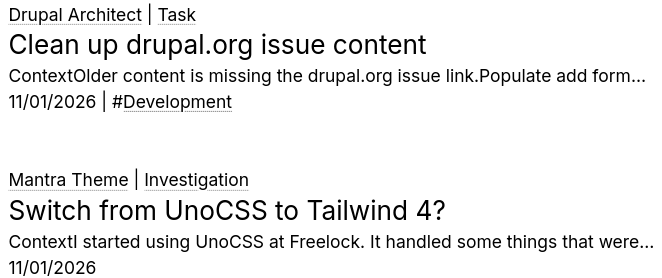
It's weird that there is no space between Context and the next line, or after the first sentence.
Questions
How is this configured?
What is making the lines concatenate without a space?
What is the way to configure this everywhere?
Discovery
AI findings
How text with summary works
text_with_summary is text_long with a second column added. Each item stores value, summary and format, and both text columns share the one text format. The summary is optional, and the form only shows it when "Summary input" is enabled on the field.
| Formatter | What it renders |
|---|---|
| Default | value only |
| Summary or trimmed | summary if there is one, otherwise value trimmed by text_summary() |
| Trimmed | value trimmed; the summary is ignored |
text_summary() cuts at the character limit. It tries to break at a paragraph, then a sentence, and it honors a break marker in the text (an HTML comment reading "break"). It then repairs the HTML so tags are closed. A summary that exists is printed as written and never trimmed, so "Summary or trimmed" can return a long summary for one node and 300 characters for the next.
Status in core and Drupal CMS
- Core (11.4):
node_add_body_field()is deprecated in 11.3.0 and is removed in 12.0.0, "There is no replacement" (change record 3516778). The field type and its formatters are not deprecated. The corearticle_content_typeandpage_content_typerecipes still shipbodyastext_with_summary. - Drupal CMS: no recipe uses
text_with_summary.drupal_cms_content_type_base,drupal_cms_starterand the site template define:field_content, atext_longfield for the formatted body;field_description, astring_longfield (plain text) for the summary. The same field also feeds the meta description and the card/teaser text.
What the combined field gives over two fields
- One field, one text format, one form widget, with the summary tucked under the body.
- The fallback is built in: "Summary or trimmed" falls back to the body when the summary is empty.
The drawbacks are why Drupal CMS split it:
- The summary is a column, not a field. It can't have its own required setting, length limit or help text, and it can't be placed separately in form displays or Layout Builder/Canvas.
- It shares the body's format, so it is usually HTML. That is a poor fit for meta descriptions and cards that need plain text.
- Views and Search API handle the summary column awkwardly.
Why "Context" runs into the next line (likely, not yet verified on this site)
When a listing strips HTML from the body (the Views option Rewrite results → Strip HTML tags, or a Search API field retrieved from the index after the HTML filter processor), PHP's strip_tags() removes <h2> and <p> without inserting whitespace. So <h2>Context</h2><p>Drupal's…</p> becomes ContextDrupal's…, and paragraphs run together in the same way. The trimmed formatter on its own keeps the markup and does not do this.
Options for listings and search results
- Search API view with the field retrieved from the index: you get the indexed value, with HTML stripped and no formatter. Switch the field to Use entity field rendering, using the Summary or trimmed formatter. For search results, the Highlight processor's Excerpt field is usually better: it shows text around the search term instead of the opening lines, which here are always the standard headers.
- A hard length cap: use Rewrite results → Trim this field to a maximum number of characters. It needs Strip HTML tags, and that brings back the concatenation above.
- Rendered entity rows: use a
search_resultor teaser view mode and configure the body formatter there once, instead of field by field in each view. This is the closest to "configure it everywhere." - Drupal CMS pattern: a plain-text
field_descriptionwritten per node avoids the headers and the stripping problem completely. Rebuild the fallback in Views by adding the body as an excluded, trimmed field and using its token as the description's No results text.
Recommendation
Keep text_with_summary where it already holds content. For new content types, follow Drupal CMS: text_long for the body plus a plain-text string_long description. In search results, use the Search API excerpt rather than either field.